A primitive colour token names a hex value. A semantic colour token names the job that value performs in the interface. Where sgds-blue-600 names a specific shade, a semantic token like sgds-link-color-default names the role "default colour for a link". The system maps each role to the right primitive behind the scenes.
sgds-link-color-default resolves to two primitives, one for each theme. Switching themes swaps the underlying primitive while every component using the link role stays unchanged.
This separation lets themes and brands shift colours without touching components. The same semantic token can point to one primitive in day mode and a different one in night mode. The role stays consistent across every component. Only the rendered hex value changes for contrast, brand, or accessibility.
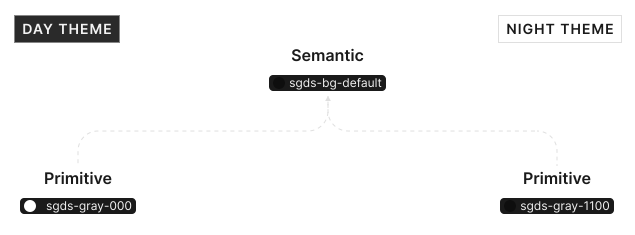
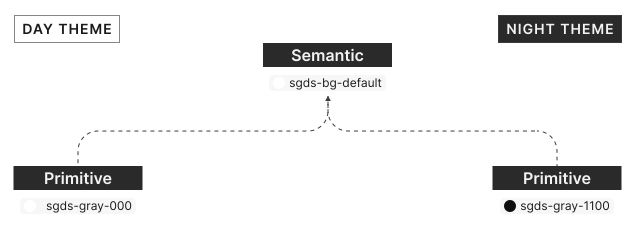
This mapping gives SGDS one place to adjust colour behaviour across components, instead of changing each component separately.
How we structure semantic colours
SGDS semantic colour names follow a role-based structure. The name tells you what the colour is for before it tells you the visual value.
- Base design element or property combines the colour role and where it is applied, such as danger surface, success text, primary border, or neutral icon.
- Modifier identifies emphasis or state, such as default, subtle, muted, inverse, fixed light, fixed dark, hover, or selected.
When we use semantic colours
SGDS uses semantic colours wherever a colour decision needs to stay meaningful across components, themes, and product brands. They let us describe the job a colour performs once, then remap the primitive values behind that job as the system grows.
- Component foundations use background, surface, foreground, and border tokens so every component responds to day mode, night mode, and brand changes consistently.
- Interaction states use semantic tokens for hover, active, selected, disabled, and inverse states, so state behaviour stays predictable across patterns.
- Status and feedback use success, danger, warning, and neutral tokens, so alerts, validation, badges, and messages share the same meaning.
- Forms use form-specific semantic tokens for fields, labels, helper text, and validation states, so form controls stay aligned with SGDS components.
- System scaling relies on semantic colours because new themes, brands, and components can reuse the same roles instead of redefining colour values one component at a time.