CLS 0: bringing Declarative Shadow DOM to Next.js
Web components and SSR have historically been incompatible. Here is how we eliminated Cumulative Layout Shift entirely for Next.js users through Declarative Shadow DOM and SSR-first component principles.

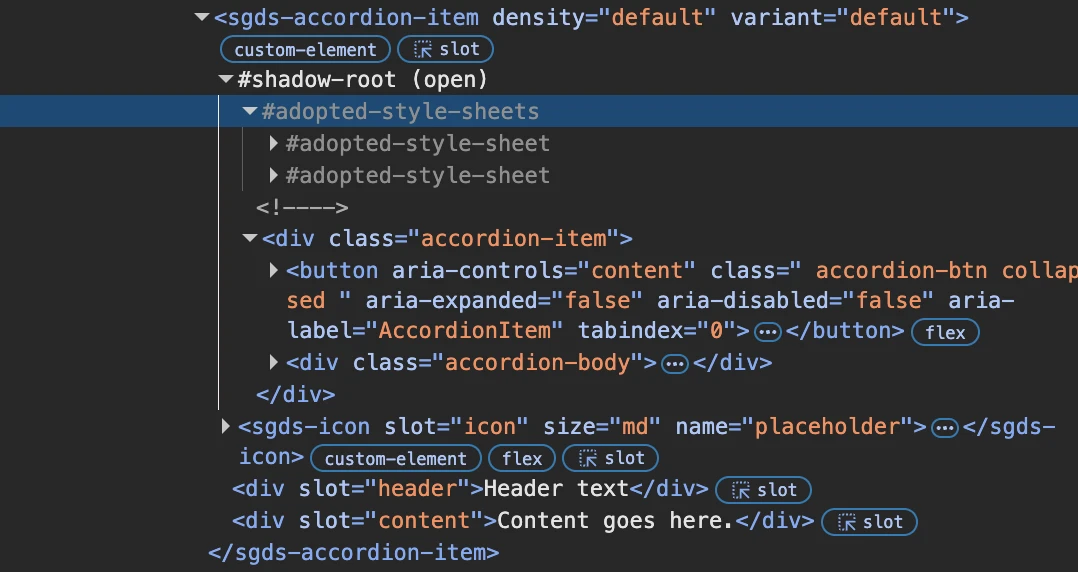
Web components use Shadow DOM to encapsulate their styles and markup. Traditionally, Shadow DOM is created entirely in JavaScript on the client side. In a client-side rendered (CSR) app, this is not an issue — the browser loads JavaScript, creates the Shadow DOM, and renders the component in one pass. But in a server-side rendered (SSR) framework like Next.js, the server generates HTML and sends it to the browser before JavaScript loads. Web components arrive as empty custom element shells with no content inside. When JavaScript finally loads and upgrades these elements, they suddenly grow from near-zero height to their actual size.
This produced a Cumulative Layout Shift (CLS) score of approximately 0.23 — well above Google's recommended threshold of 0.1. Users would see the page visibly jump and reflow as components popped in.
We set out to eliminate this entirely.
The problem: web components and server-side rendering
Shadow DOM is the core technology behind web components. It provides style and markup encapsulation, ensuring that a component's internal styles do not leak out and external styles do not leak in. But Shadow DOM has always been a client-side JavaScript construct. It is created by calling element.attachShadow() in the browser.
In a traditional client-side rendered (CSR) React app, this works fine. The browser loads, JavaScript runs, and components render. But in a server-side rendered (SSR) framework like Next.js, the server generates HTML and sends it to the browser before JavaScript loads. Web components arrive as empty shells with no shadow DOM, no styles, and no content.
When JavaScript finally loads and upgrades these elements, the components snap from zero height to their full size. This creates visible layout shift that degrades user experience and Core Web Vitals scores.
The solution: Declarative Shadow DOM
The result: CLS 0
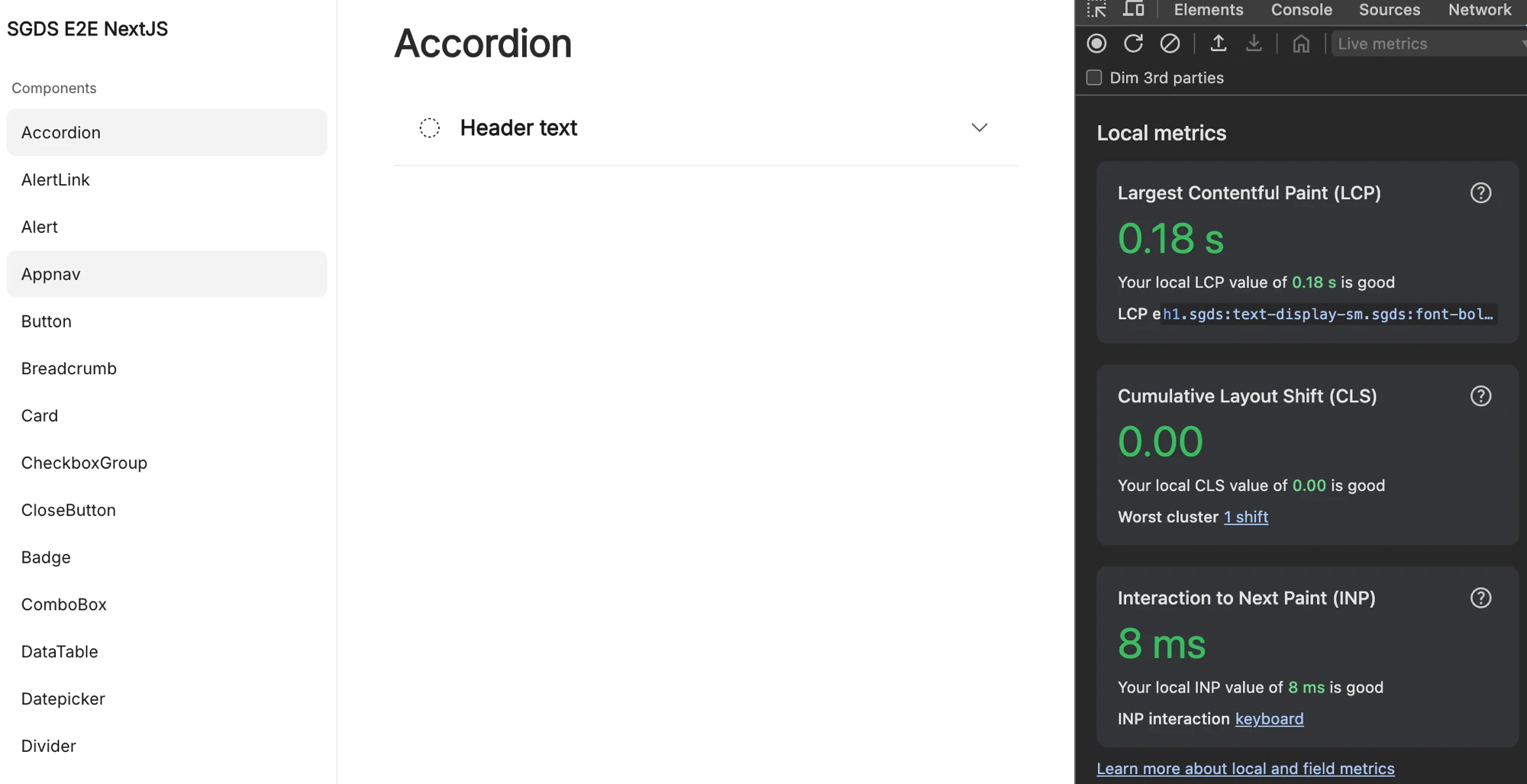
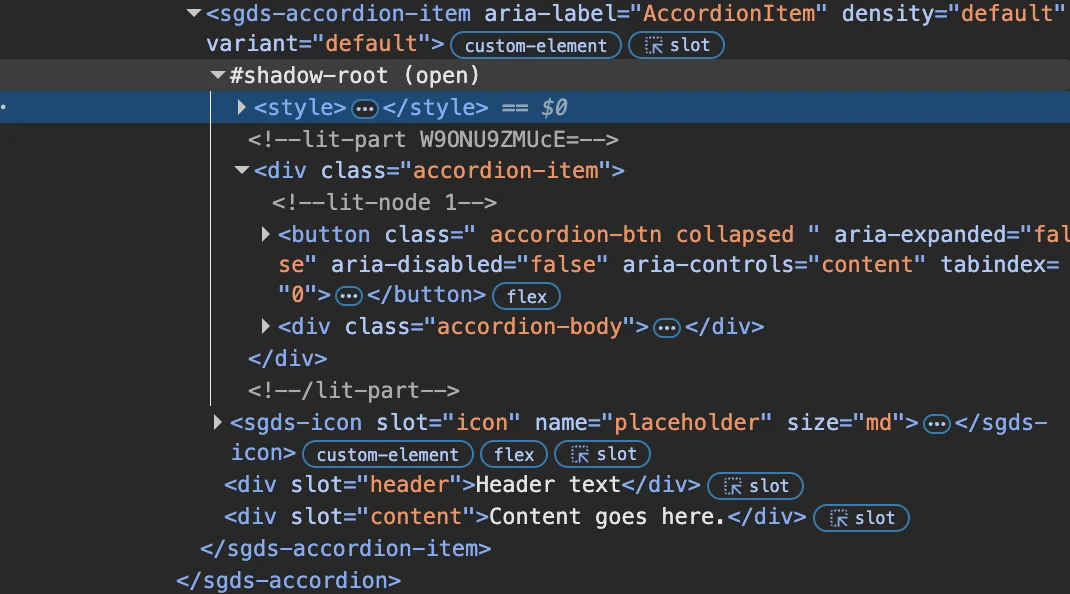
Declarative Shadow DOM (DSD) is a browser feature that allows Shadow DOM content to be included directly in the server-rendered HTML, inside a special <template> tag with the shadowrootmode attribute set to open. The browser processes this immediately during HTML parsing, with no JavaScript needed. Components arrive fully formed from the server with their styles and structure already in place.
With DSD, the server renders the complete shadow DOM tree including component styles as inline <style> tags inside the template. The browser adopts this shadow DOM during HTML parsing and Lit hydrates it on the client without re-rendering. The result is zero layout shift and zero flash of unstyled content.
Without DSD (client-side only)
With DSD (server-rendered)
Making components SSR-first
Getting Declarative Shadow DOM working was only part of the story. We had to rethink how our components render to ensure the server and client produce identical HTML. Any mismatch between server-rendered DSD and the client's first render causes Lit's hydration to fail, resulting in broken UI or duplicated content.
We established four development principles that now govern all SGDS component development.
1. Single-template rendering
We refactored these components to render a single unified template. CSS media queries handle all visual differences between mobile and desktop. JavaScript breakpoint detection is used only for behavioral differences like click handler dispatching and Floating UI setup, never for template selection.
Components like sgds-mainnav previously used JavaScript to detect screen size and switch between completely different mobile and desktop templates. Since the window object does not exist on the server, this broke SSR. Guarding with typeof window checks avoided the crash but produced the wrong DSD. The server would render desktop HTML, while a mobile device expected mobile HTML, and Lit's hydration could not reconcile the structural mismatch.
2. CSS-first visibility
Instead of conditionally rendering elements with JavaScript, components now always render their full DOM and use CSS classes to show or hide elements. This ensures the server and client HTML always match structurally. For example, both mobile and desktop icons are rendered in the template but CSS shows only the appropriate one based on the viewport.
3. Deferred slot detection
Slot-based layout decisions, such as checking whether a component has a title slot or a description slot, previously relied on the HasSlotController which uses browser APIs. During SSR, these APIs are unavailable, causing rendering inconsistencies.
We introduced dedicated SSR indicator properties like hasTitleSlot and hasDescriptionSlot that can be set from the server. The HasSlotController checks are deferred until after the component has hydrated on the client. This ensures SSR markup generation is deterministic while maintaining full reactivity after hydration.
4. Client API guards
Lit has a well-defined rendering lifecycle for SSR. Only render() and certain reactive lifecycle methods execute on the server — browser APIs like window, document, and DOM measurement methods do not exist in that context. We consciously restrict all browser-specific logic to the appropriate client-only lifecycle hooks such as connectedCallback(), firstUpdated(), and event handlers, ensuring components render cleanly on the server without crashes or hydration mismatches.
How SSR works under the hood
Developers wrap their next.config.mjs with withSgdsNextSSR(). Under the hood, this aliases the standard react component imports to SSR-aware versions that are monkey-patched to render Declarative Shadow DOM on the server. On the server, React's jsx() and createElement() functions are patched so that every SGDS component outputs its full shadow DOM as inline HTML. In the browser, hydration support kicks in so the browser adopts the server-rendered shadow DOM without re-rendering.
This works with both webpack and Turbopack. The alternative plugin, @lit-labs/nextjs, required a webpack-only plugin that did not work with Turbopack at all.
CSP nonce support
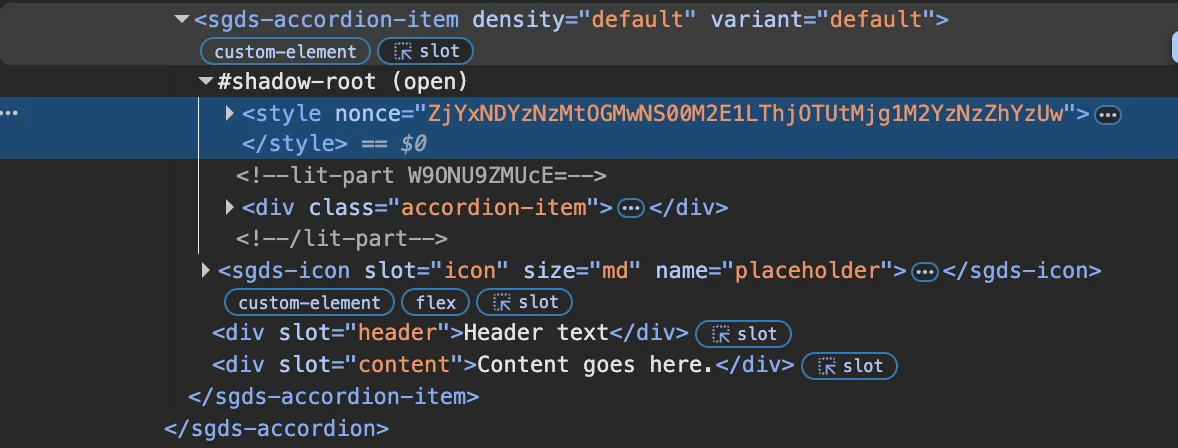
If your Next.js app enforces a strict Content Security Policy with a style-src nonce directive, you will need one additional step. Without it, the browser blocks the inline <style> tags inside Declarative Shadow DOM because they lack the required nonce. Components render their HTML structure but have no styles.
This happens because SSR embeds component CSS directly inside each shadow root as inline <style> tags. A strict CSP that only allows style-src 'self' 'nonce-...' will block any inline style without a matching nonce.
To fix this, import setCSPNonce from @govtechsg/sgds-web-component/react/ssr and call it in your root layout server component. This stamps the nonce onto every inline <style> tag during server rendering.
What developers need to do
SSR is opt-in and your existing setup continues to work as before. For the full step-by-step setup guide, see the Next.js tab on the Getting Started page.
Server-side rendering for web components required rethinking component architecture from the ground up. Every component had to produce identical HTML on the server and client. Every browser API had to be guarded. Every responsive layout had to work through CSS alone.
The result is CLS 0, CSP compliance, and a developer experience that requires no build configuration beyond a single config wrapper. Our end-to-end tests for DSD and SSR-first composition are automated in CI pipelines, ensuring this remains a reliably supported feature for Next.js users.
Published November 2026
Singapore Government Design System
The Singapore Government Design System was developed to empower teams in creating fast, accessible and mobile-friendly digital services.