Design and code, finally speaking the same language
How AI-assisted workflows can narrow the translation gap between design intent and implementation.

From handoff to shared systems
Traditionally, design handoff relied heavily on screenshots, annotations, walkthroughs, and manual interpretation, as discussed in The learning curve before AI.
Designers created screens in Figma while thinking about hierarchy, interaction behaviour, accessibility, and user flows. Developers then translated those screens into implementation by interpreting spacing, responsive behaviour, component usage, and frontend logic.
Over time, small differences naturally appeared across the workflow. Interaction patterns drifted, accessibility handling varied, and responsive behaviour changed between implementations.
AI is changing how design and development connect
One major shift in AI-assisted delivery is the move from static handoff to connected system context.
Instead of relying only on screenshots and annotations, teams can give AI tools access to structured design information.
Figma MCP is one example. It allows coding agents to read information directly from the design file. When the design file uses SGDS v3 components, tokens, and patterns, the agent can read that system context as part of the design.
Before Figma MCP
Designers usually handed over screens, notes, and links, while developers or AI tools worked from screenshots and manual explanations. That made it easy for design intent to get lost.
When Figma MCP first arrived
With Figma MCP, AI can access design context directly from selected Figma frames instead of guessing from images. With a design system, it can better map components, variables, and layout context to produce more accurate outputs.
What it can do now
AI can work with richer design context, move between code and Figma, and write directly to the Figma canvas when the MCP client supports it.
Connecting design directly to implementation
A designer working with SGDS can hand over screens through Figma MCP. This means that components inside Figma are no longer isolated from implementation.

With Figma Code Connect, those components can carry structured system context that is linked to implementation behaviour.
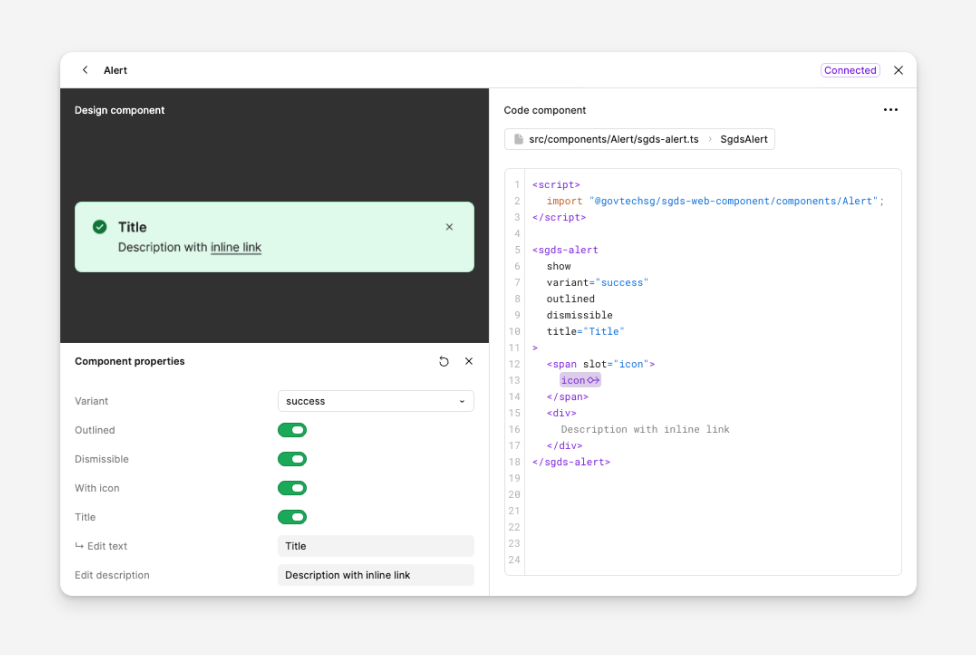
This connection gives AI agents access to shared foundations:
- Design tokens for colours, spacing, and other foundations
- SGDS component structures that align with the codebase
- Repository context from GitHub
SGDS skills give coding agents system context
Implementation is the next part of the workflow. When SGDS agent skills are installed, these skills give coding agents guidance on component usage, token foundations, layout patterns, content, and implementation structure.
Agents can then reference SGDS guidance while working. They can map components to patterns, reference tokens and utilities, and generate code based on the intended behaviour.
This assumes that designers and developers are both using SGDS in the workflow.
Sending code back to Figma
Implementation often evolves faster than design files. A developer may ship a feature, adjust a layout based on user feedback, or introduce new sections during development. Over time, the Figma file can drift away from what is running in production.
This is one reason product development is gradually moving away from handoff as a one-way process.
With Figma MCP, designers can bring implementation back into Figma when needed. A team can ask a coding agent to send the interface back to Figma and map it to SGDS components. The result can be reviewed as editable layers in Figma.

Designers can then edit the parts needed for the task. When the design is ready, the updated direction can also be sent back to code.
A shared language for design, code, and AI
This workflow is about keeping design and implementation context connected.
SGDS components, tokens, Figma MCP, Code Connect, and agent skills allow design and implementation to refer to the same system context. Designers can create with components that correspond to the codebase. Developers can refer to structured design intent. Agents can use the same component, token, and pattern references.
Teams still need to review accessibility, interaction quality, content, and production behaviour. The translation work between design and code still exists, but more of the context can be carried through the workflow.
In this model, SGDS acts as a shared reference across design, code, and AI-assisted work.
Note
This post describes the general direction for how design and development collaboration can work with shared system context. MCP is still blocked for GovTech's Claude Code at the time of writing.
Understand how it works:
Published May 2026
Singapore Government Design System
The Singapore Government Design System was developed to empower teams in creating fast, accessible and mobile-friendly digital services.